If you have an Android TV box and want a better way to watch live TV, movies, series, or other content from your own IPTV subscription, choosing the right IPTV app can make a big difference.
The best IPTV app for an Android TV box should be easy to control with a remote, support common playlist formats, load channels quickly, offer a useful electronic programme guide (EPG), and provide a smooth viewing experience on a large screen.
However, there is an important distinction to understand: an IPTV player is not the same thing as an IPTV service. Most IPTV player apps do not provide TV channels themselves. Instead, they allow you to add a playlist or login from a provider you are legally entitled to use.
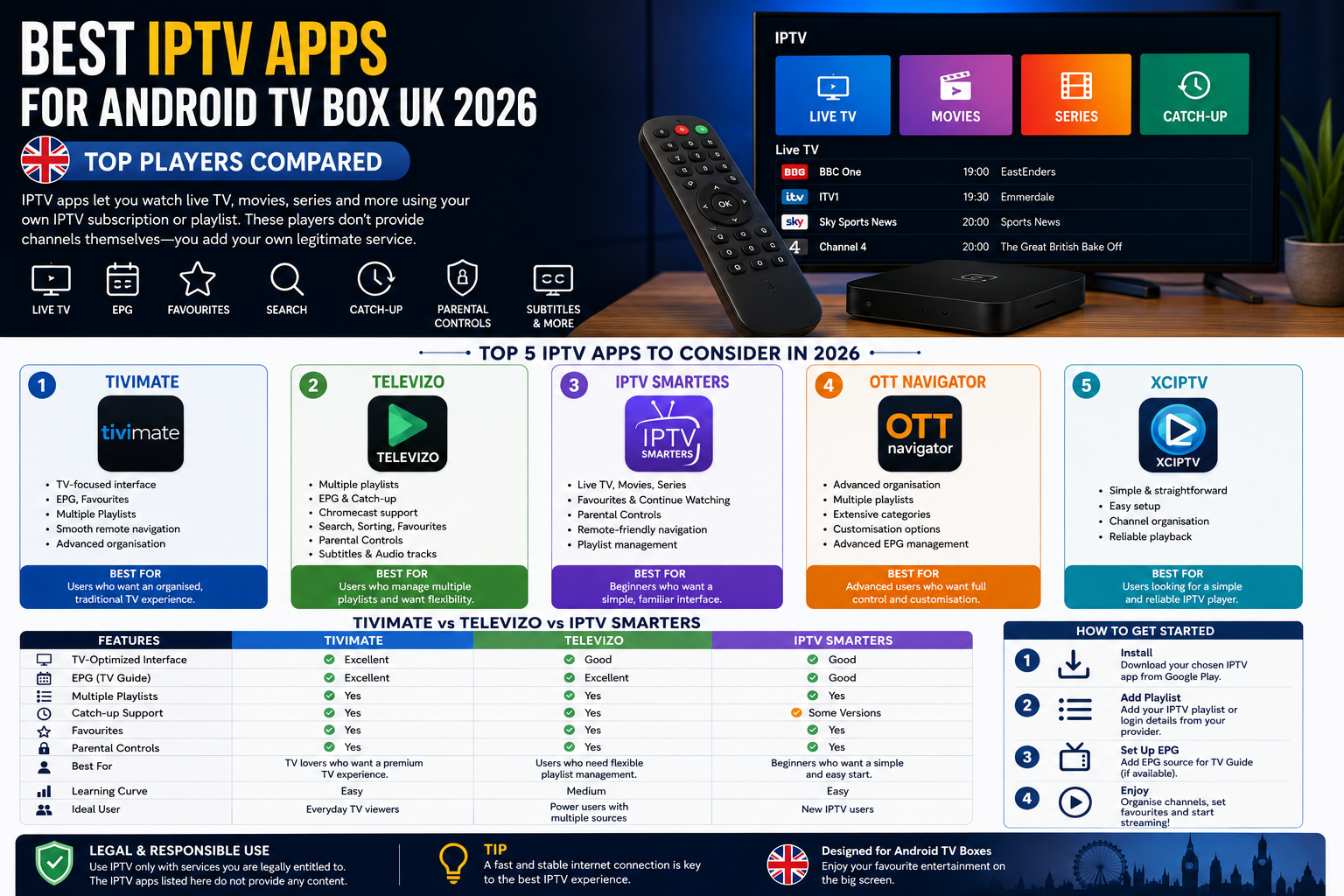
In this guide, we’ll compare some of the most popular IPTV players for Android TV boxes in 2026, including TiviMate, Televizo, IPTV Smarters, OTT Navigator, and XCIPTV. We’ll also explain how to choose an app, install it, improve playback, and connect it with a suitable IPTV subscription.
What Is an IPTV App for Android TV Box?
An IPTV app is a media player that allows you to access television streams delivered through an internet connection.
Instead of receiving television through a traditional aerial, satellite dish, or cable connection, an IPTV setup generally uses an internet connection to deliver the video stream to your device.
On an Android TV box, an IPTV player can organise your available channels into categories and provide features such as:
- Live TV channel lists
- Electronic Programme Guide (EPG)
- Favourites
- Search
- Multiple playlists
- Catch-up functionality
- Subtitles
- Audio-track selection
- Parental controls
- VOD and series organisation
- Remote-control navigation
The exact features vary between applications.
It’s also important to understand that the IPTV player normally does not supply the channels. For example, Televizo explicitly describes itself as a media player and says users need to add their own playlist.
The same distinction applies to IPTV Smarters and similar applications.
Therefore, you’ll generally need two things:
- IPTV player app:
The application installed on your Android TV box. - IPTV service or playlist:
A legitimate source containing the channels or media you are authorised to watch.
Best IPTV Apps for Android TV Box UK in 2026
There isn’t one IPTV app that is perfect for every user. Your ideal choice depends on whether you prioritise simplicity, EPG functionality, customisation, playlist management, or an interface designed specifically for television.
Here are five options worth considering in 2026.
1. TiviMate — Best Overall for TV-Focused Users
TiviMate is one of the best-known IPTV players for Android TV-style devices and is particularly popular among users who want a traditional television-like interface.
Its main strength is the way it presents IPTV channels. Instead of feeling like a basic mobile media player, the interface is designed around navigating television content with a remote.
Why choose TiviMate?
TiviMate is a strong option if you want:
- A TV-oriented interface
- Channel categories
- EPG support
- Favourites
- Multiple playlists
- Easy remote navigation
- A familiar live-TV experience
- More advanced organisation options
For someone moving from a traditional satellite or cable box to an Android TV setup, this style of interface can feel more natural.
Best for
Users who want an organised, traditional TV experience on Android TV.
Potential downside
Some advanced features may depend on the version or subscription tier available to you. Always check the current app listing and feature availability before making a decision.
2. Televizo — Best for Flexible Playlist Management
Televizo is another strong IPTV player for Android TV.
Its current Google Play listing highlights support for multiple playlists, EPG, catch-up, Chromecast, sorting, searching, favourites, parental controls, and multiple audio/video tracks and subtitles. The listing was updated in June 2026.
This makes Televizo particularly interesting for people who want flexibility rather than simply a basic channel player.
Why choose Televizo?
Some of its useful features include:
- Multiple playlist support
- EPG
- Catch-up
- Chromecast support
- Search
- Sorting
- Favourites
- Parental controls
- Subtitle support
- Audio and video track selection
Another important advantage is that Televizo clearly states that it does not provide content itself.
That makes the player/provider distinction easy to understand.
Best for
Users who manage multiple legitimate IPTV playlists and want flexible organisation.
Potential downside
The interface may not be everyone’s preferred choice, particularly if you want the most traditional cable-TV-style experience.
3. IPTV Smarters — Best for Beginners
IPTV Smarters is another widely recognised name in the IPTV-player category.
Current versions available on Google Play describe the app as a media-list organiser and player rather than a provider of television content. One current listing states that it supports Android TVs and TV boxes and is designed for remote-control navigation.
For beginners, this type of straightforward interface can be useful.
Why choose IPTV Smarters?
Depending on the version you’re using, you may find features such as:
- Live TV organisation
- Movies and series categories
- Favourites
- Continue watching
- Parental controls
- Remote-friendly navigation
- Playlist management
The biggest advantage is familiarity. Many IPTV users have encountered a Smarters-style interface before, so switching devices can be relatively straightforward.
Best for
Beginners who want a simple IPTV player interface.
Potential downside
There are multiple applications using names such as “IPTV Smarters,” “Smarters Player,” and similar variations. Always check the developer, app description, permissions, and current availability before installing an application.
4. OTT Navigator — Best for Advanced Users
OTT Navigator is aimed more toward users who want extensive control over how their IPTV content is organised.
Compared with simpler IPTV players, advanced applications can offer more ways to customise the viewing experience, manage channels, and organise different sources.
Why advanced users may prefer it
Depending on the current version and platform support, advanced IPTV players can be useful when you have:
- Multiple playlists
- Large channel libraries
- Extensive categories
- Different content sources
- Complex EPG requirements
- A preference for customisation
Best for
Experienced IPTV users who want more control over organisation and interface behaviour.
Potential downside
More features can mean a steeper learning curve.
If you simply want to open your Android TV box and start watching, a simpler player may be more convenient.
5. XCIPTV — Best for a Simple Alternative
XCIPTV is another IPTV-player option commonly associated with Android-based devices.
Its appeal is primarily its straightforward approach to IPTV playback and channel organisation.
For users who don’t need a highly customised interface, a simpler IPTV player can sometimes be the better choice.
Best for
Users looking for a straightforward IPTV-player experience.
Potential downside
The exact features, availability, and support can vary between versions and app listings, so check the current source before installation.
TiviMate vs Televizo vs IPTV Smarters
If you’re trying to decide between the three most commonly considered options, here’s a quick comparison.
| Feature | TiviMate | Televizo | IPTV Smarters |
| Android TV focused | Excellent | Yes | Yes |
| EPG | Yes | Yes | Depends on version |
| Multiple playlists | Yes | Yes | Yes/depends on version |
| Catch-up | Available depending on setup/version | Yes | Depends on version |
| Remote navigation | Excellent | Good | Good |
| Beginner friendly | Good | Good | Excellent |
| Customisation | High | Good | Moderate |
| Best for | TV enthusiasts | Flexible playlist users | Beginners |
Our overall pick: TiviMate is a strong choice for users who want a TV-first interface, while Televizo is particularly attractive for flexible playlist management. IPTV Smarters is worth considering if simplicity is your priority.
How to Choose the Best IPTV App for Android TV Box
Don’t choose an IPTV player based only on its name or popularity.
Instead, consider the following factors.
1. Android TV Compatibility
The app should work properly with your Android TV box and its remote control.
A mobile-focused application may technically install but still provide a poor experience on a television.
Look for:
- D-pad navigation
- Large menus
- TV-optimised layouts
- Remote-control support
- Android TV compatibility
2. EPG Support
An EPG, or Electronic Programme Guide, displays programme information in a TV-guide format.
A good EPG can make a major difference when you have hundreds or thousands of channels.
Instead of opening individual channels to find what’s playing, you can browse upcoming programming through a guide.
If you regularly watch live television, EPG support should be high on your list.
3. Playlist Support
Check which playlist or login methods the application supports.
Common formats include:
- M3U playlists
- M3U8 playlists
- Provider-specific login systems
- Other supported playlist formats
Your IPTV provider should tell you which format or credentials you need to use.
Never enter credentials into an unknown application simply because it claims to support IPTV.
4. Search and Favourites
If your IPTV service contains a large number of channels, searching becomes extremely useful.
Favourites are also helpful because you can create a smaller list of channels you watch regularly.
Instead of scrolling through hundreds of channels every evening, you can access your preferred channels quickly.
5. Catch-Up Support
Catch-up allows supported content to be watched after its original broadcast time.
However, this feature depends on both the IPTV player and the source/playlist.
Installing an app that supports catch-up doesn’t automatically mean every channel will have catch-up available.
6. Stability and Performance
A good IPTV app should not consume unnecessary system resources.
However, playback quality isn’t determined by the player alone.
Your experience can also depend on:
- Internet speed
- Wi-Fi quality
- Ethernet connection
- Android TV box hardware
- Server performance
- Stream quality
- Network congestion
- Video resolution
This is why changing the IPTV app may not solve every buffering problem.
For additional troubleshooting advice, you can read our guide on IPTV not working and common IPTV problems.
How to Install an IPTV App on Android TV Box
Installing an IPTV player is usually straightforward.
Step 1: Connect your Android TV box
Connect the box to your television and make sure it has a working internet connection.
For the best experience, use a reliable Wi-Fi connection or Ethernet where practical.
Step 2: Open Google Play Store
Navigate to the Play Store on your Android TV box.
Search for the IPTV player you want to use.
Step 3: Check the application
Before installing, verify:
- Developer name
- App description
- Recent updates
- Reviews
- Permissions
- Android TV compatibility
Avoid downloading random APK files from unknown websites simply because an app isn’t immediately visible in your preferred app store.
Step 4: Install the app
Select the application and choose Install.
Once installation finishes, open it.
Step 5: Add your IPTV source
The application may ask you to add a playlist or login.
Depending on the provider and app, this could involve an M3U playlist or another supported method.
Only use credentials or playlists that you are authorised to use.
If you’re new to IPTV installation, our IPTV Installation Guide can help you understand the general setup process.
How to Get Better IPTV Performance on Android TV Box
Even the best IPTV player won’t perform well if your network or hardware is struggling.
Here are several practical improvements.
Use Ethernet Where Possible
If your Android TV box is close enough to your router, an Ethernet connection can provide a more consistent connection than congested Wi-Fi.
This can be especially useful for high-resolution video.
Restart Your Router
Temporary network issues can sometimes affect streaming.
Restarting your router and Android TV box can clear simple connectivity problems.
Close Unnecessary Apps
If your Android TV box has limited RAM, background applications can consume system resources.
Close applications you aren’t using.
Keep Storage Available
Very low storage can affect overall device performance.
Remove applications and files you don’t need.
Don’t Automatically Blame the IPTV Player
If one channel buffers while another plays normally, the problem may be associated with the particular stream or source rather than your IPTV application.
Likewise, if every service on your Android TV box is buffering, investigate your network first.
What Is the Best IPTV App for Live Sports and Football?
For sports fans, the player itself isn’t what determines which sports channels you can watch.
The IPTV application is primarily responsible for playing and organising the streams provided through your source.
Therefore, when choosing an IPTV setup for football or other live sports, consider:
- EPG quality
- Fast channel switching
- Stable playback
- Favourites
- Search
- Remote navigation
- Catch-up where legitimately available
- Quality of your authorised content source
If you’re specifically interested in watching football through IPTV, you can also explore our guide to IPTV with Live Football.
Remember that sports broadcasting rights differ by country and competition. A legitimate service should have the appropriate rights or permissions for the content it provides.
IPTV App vs IPTV Subscription: What’s the Difference?
This is one of the most important things beginners need to understand.
An IPTV app is software.
An IPTV subscription is a service or content source.
Think about it like this:
IPTV app = media player
IPTV subscription = content/service
Installing TiviMate, Televizo, IPTV Smarters, or another player doesn’t automatically give you television channels.
You need a legitimate content source that works with your chosen application.
If you’re looking for an IPTV subscription for compatible devices, you can explore the available options from Sky Glass IPTV Store and choose a package based on your requirements.
Before subscribing, check exactly what content is offered, which devices are supported, the applicable terms, and whether the service is authorised to provide the content in your location.
Using Sky Glass IPTV Store With an Android TV Box
Android TV boxes can be convenient devices for IPTV because they provide a dedicated television interface and allow you to install compatible media-player applications.
If you’re using a compatible IPTV service, the general process is:
- Connect your Android TV box to the TV.
- Connect the device to the internet.
- Install a compatible IPTV player.
- Obtain your authorised IPTV playlist or login details.
- Add the information to the player.
- Load your channels or content.
- Organise favourites and EPG settings.
- Start watching supported content.
For subscription options, visit the Buy IPTV Subscription page from Sky Glass IPTV Store.
If you need help setting up your device, use the IPTV Installation Guide for the relevant installation steps.
Common IPTV Problems on Android TV Box
Even after choosing a good application, you may encounter problems.
IPTV App Keeps Buffering
Possible causes include:
- Weak Wi-Fi
- Network congestion
- Slow internet
- Overloaded stream source
- High-resolution video
- Android TV box limitations
Try switching to Ethernet, restarting your router, lowering video quality where supported, or testing another legitimate stream.
Channels Won’t Load
First check whether the problem affects:
One channel or all channels.
If only one channel is affected, the issue may be with that particular stream.
If everything fails, check your internet connection and IPTV login or playlist.
EPG Is Not Showing
An EPG depends on the information supplied by the source and the way your IPTV player processes it.
Check that:
- Your playlist supports EPG information.
- The correct EPG data is configured.
- The device has internet access.
- The EPG has been refreshed.
IPTV App Crashes
Try:
- Restarting the application.
- Restarting your Android TV box.
- Clearing the app cache.
- Checking for updates.
- Removing unnecessary applications.
- Reinstalling the app if necessary.
If problems continue, the device itself may need attention.
For more troubleshooting advice, see our guide on IPTV not working and how to fix common problems.
Is IPTV Legal in the UK?
IPTV technology itself is not automatically illegal. The important issue is how the service and content are being used.
Legal IPTV services can distribute television and video content over the internet when they have the necessary rights or permissions.
The problem arises when services or devices provide access to copyrighted television programmes, films, or premium sports without proper authorisation.
The UK government’s guidance explains that streaming devices can be used legally for legitimate content but can become illicit when adapted to access subscription television, films, or sports content without the appropriate rights.
Recent UK enforcement also demonstrates that illegal subscription streaming remains an active issue. In August 2026, the Crown Prosecution Service reported a conviction involving the sale of unauthorised television, sport, and film streaming subscriptions.
Therefore, when choosing an IPTV provider, don’t judge a service only by the number of channels or extremely low price.
Look for transparency about:
- Content rights
- Service terms
- Company information
- Supported devices
- Payment security
- Customer support
- Refund policies
- Where the service operates
Using an IPTV player with a legitimate source is very different from using an app or service to access copyrighted premium content without permission.
Which IPTV App Should You Choose?
The best IPTV app for your Android TV box ultimately depends on your needs.
Choose TiviMate if:
You want a polished, TV-focused interface with strong channel organisation and EPG functionality.
Choose Televizo if:
You want flexible playlist management and features such as EPG, catch-up, search, favourites, and Chromecast support.
Choose IPTV Smarters if:
You’re a beginner who wants a relatively straightforward interface for organising your IPTV content.
Choose OTT Navigator if:
You’re an advanced user who values customisation and detailed organisation.
Choose XCIPTV if:
You want a simpler alternative and don’t require extensive customisation.
Best IPTV App for Android TV Box UK 2026
The best IPTV app isn’t necessarily the one with the most features.
For most Android TV users, the most important things are reliable playback, good remote navigation, EPG support, easy channel organisation, playlist compatibility, and a clean interface.
If you want a traditional TV-style experience, TiviMate is a strong option to consider. Televizo stands out for flexible playlist management and useful features such as EPG and catch-up. IPTV Smarters can be a convenient choice for beginners, while advanced users may prefer a more customisable player such as OTT Navigator.
Most importantly, remember that the IPTV player and IPTV service are separate. Your application provides the interface for playing your content; the source determines what content is available.
If you’re ready to set up IPTV on your Android TV box, start by choosing a compatible player and then use an IPTV service that is authorised to provide the content you want to watch.
Want to explore your IPTV options? Visit Sky Glass IPTV Store to learn more about available IPTV subscriptions and compatible-device support.