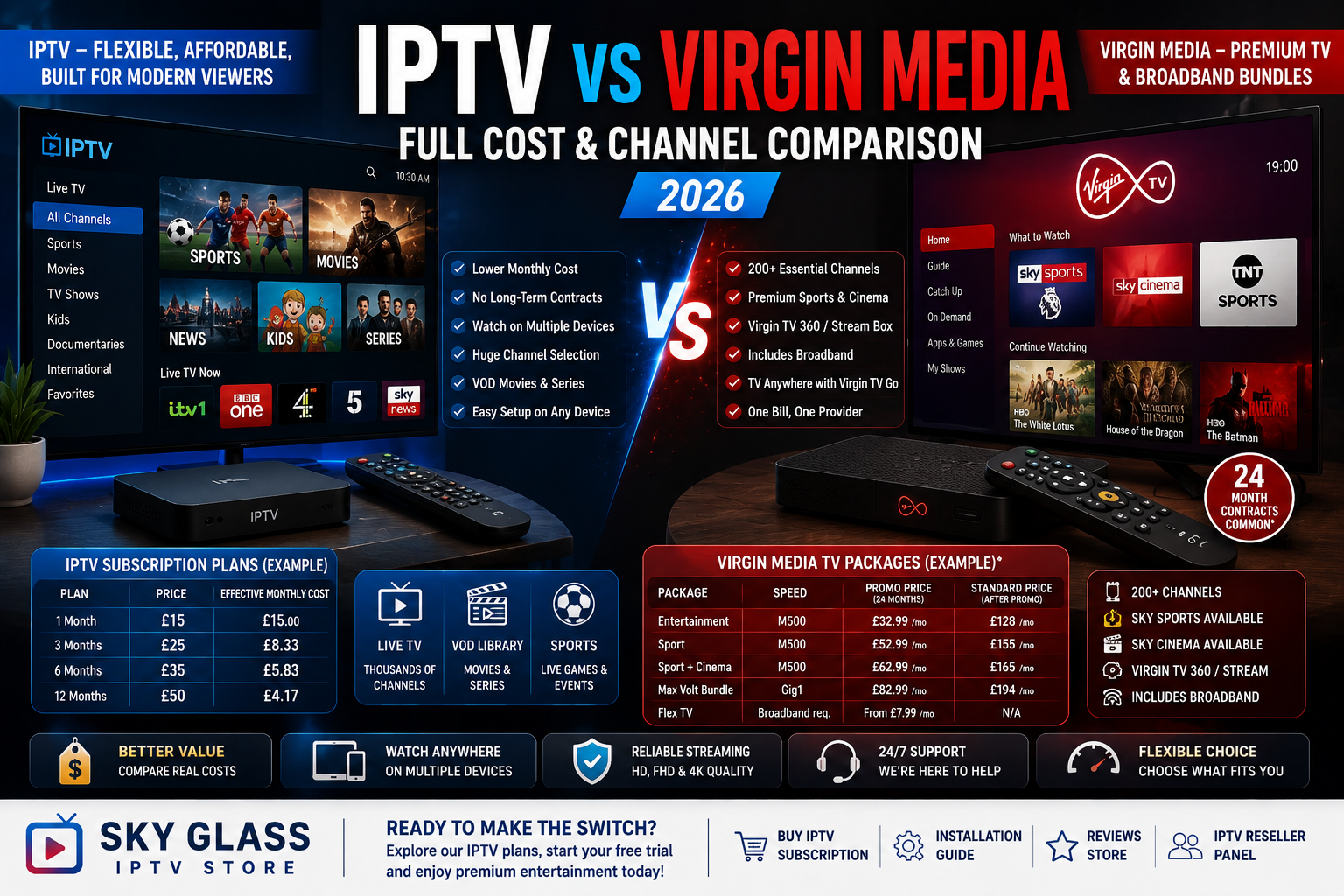
If you’re paying for Virgin Media every month and wondering whether IPTV could give you more channels for less money, you’re not alone. The two services work very differently: Virgin Media combines TV with broadband and premium content packages, while IPTV delivers television over an internet connection through a compatible app or device.
But which option actually gives you better value in 2026?
In this guide, we’ll compare IPTV vs Virgin Media across monthly cost, channels, sports, movies, 4K streaming, flexibility, contracts, equipment, reliability and overall value. We’ll also explain why the cheapest option isn’t automatically the best one and what UK viewers should check before choosing an IPTV provider.
IPTV vs Virgin Media: What’s the Difference?
The biggest difference between IPTV and Virgin Media is the way the services are structured.
Virgin Media is a traditional telecommunications and pay-TV provider. Its current TV packages are bundled with its broadband services, with options ranging from flexible TV packages to larger bundles containing entertainment, sports and cinema content. Virgin Media currently advertises more than 200 essential and free-to-air channels with its TV packages, while larger packages add premium content such as Sky Sports and Sky Cinema.
IPTV, by contrast, is a delivery method rather than a single television company. IPTV means television content delivered over an internet connection. A provider supplies the service, while you normally watch through a compatible IPTV player, Smart TV application, streaming device, computer or other supported hardware.
This distinction is important because IPTV pricing and channel availability vary enormously between providers. A legitimate IPTV service should have appropriate rights to the content it offers, so consumers should always check what a provider actually includes and whether its service is authorised in their market.
For a UK viewer, the decision therefore isn’t simply “IPTV or Virgin Media?” It’s really about which setup better matches your budget, viewing habits, equipment and expectations.
How Much Does Virgin Media TV Cost in 2026?
Virgin Media pricing is more complicated than simply paying for a TV channel package because many current offers combine television with broadband.
For example, Virgin Media’s August 2026 offers include an Entertainment package with M500 broadband advertised at £32.99 per month for 24 months, with standard pricing currently listed at £128 per month after the promotional period. Its Sport package is advertised at £52.99 per month for 24 months, while Sport + Cinema is listed at £62.99 per month for 24 months on the current offer page. Premium bundles can cost considerably more.
These figures need to be interpreted carefully.
The headline price isn’t necessarily the price of TV alone. Broadband is often included, and some bundles also include services such as Netflix or O2 benefits. Contract length and the standard price after the promotional period also matter.
Virgin Media’s current offers generally use 24-month minimum terms on many new-customer packages. That means a package advertised at a lower introductory price shouldn’t be compared directly with a month-to-month streaming subscription without considering the complete contract cost.
There can also be additional charges for premium services, extra TV boxes and upgrades. Virgin Media currently states that additional TV boxes can carry monthly charges, while premium channels and packs can cost extra.
So, when comparing Virgin Media with IPTV, always calculate the actual cost over the full period rather than looking only at the first month’s price.
How Much Does IPTV Cost in the UK?
IPTV pricing is usually much simpler.
Most IPTV subscriptions are sold as standalone entertainment services with monthly, quarterly, six-month or annual options. The exact price depends on the provider, package length, number of connections, available content and features.
Longer subscriptions generally reduce the effective monthly price. A one-month subscription may have a relatively high monthly equivalent, while a 12-month plan can reduce the average monthly cost substantially.
This is one of the main reasons IPTV attracts viewers who already have broadband but don’t want another expensive television-and-broadband bundle.
However, price shouldn’t be the only consideration.
A provider advertising thousands of channels for an extremely low price may not offer the reliability, customer support, infrastructure or content rights that a customer expects. Before purchasing, check the provider’s pricing, terms, support options, trial policy and information about content rights.
If you’re comparing options, you can review the available packages on the Buy IPTV Subscription page before deciding which plan matches your viewing requirements.
IPTV vs Virgin Media: Cost Comparison
The most important difference becomes clear when you look at what you’re actually paying for.
| Factor | IPTV | Virgin Media |
| Basic payment | Usually TV subscription only | Often TV + broadband bundle |
| Contract | Often flexible | Many offers use minimum terms |
| Monthly pricing | Usually straightforward | Promotional and standard pricing can differ |
| Broadband included | No | Often yes |
| TV equipment | Usually existing device/app | Virgin TV equipment supplied depending on package |
| Premium sports | Depends on provider/package | Available through premium packages |
| Movies | Depends on provider/package | Sky Cinema available on relevant packages |
| Catch-up | Depends on service | Available on supported Virgin TV services |
| Apps | Depends on device | Integrated into Virgin TV experience |
| Extra boxes | Depends on provider | Additional boxes can carry monthly charges |
| Content rights | Must be checked provider-by-provider | Established licensed pay-TV service |
| Flexibility | Generally high | Depends on package and contract |
The comparison therefore isn’t simply about which service has the lower monthly number.
Virgin Media’s price can include broadband, TV hardware, premium channels and access to its wider ecosystem. IPTV can be cheaper if you already have a reliable broadband connection and compatible hardware.
Channel Comparison: IPTV vs Virgin Media
Channel count is one area where IPTV providers often advertise very large numbers.
Some IPTV services advertise tens of thousands of live channels alongside extensive video-on-demand libraries. However, consumers should be careful when comparing headline channel numbers.
More channels don’t automatically mean better television.
A list containing thousands of channels may include international stations, regional feeds, duplicate channels, radio streams and content you will never watch. What matters more is whether the channels you actually want are available, reliable and legally provided.
Virgin Media takes a different approach.
Its current TV packages are organised around established entertainment, sports, cinema, children’s and other channel collections. Virgin Media currently promotes more than 200 essential and free-to-air channels, with additional premium collections available depending on the package.
Its current channel offering also includes Sky content in eligible packages. For example, Sky Atlantic HD became available to Virgin TV customers with Virgin TV 360 or Stream and a package containing Sky Entertainment channels, according to Virgin Media’s June 2026 channel information.
This makes Virgin Media’s channel model easier to understand: you choose a package, and the channels included in that package are clearly defined.
With IPTV, the quality of the channel list depends much more heavily on the individual provider.
IPTV vs Virgin Media for Sports
Sports are often one of the biggest reasons UK households pay for premium television.
Virgin Media offers sports packages that can include Sky Sports, while TNT Sports is available as an add-on or within selected bundles. Virgin Media’s current information specifically lists Sky Sports in eligible packages and TNT Sports as an additional option.
This can make Virgin Media attractive to households that want a conventional television service with premium sports integrated into the same setup.
IPTV providers may also advertise extensive sports coverage, including football, motorsport, cricket and other international events. But this is an area where consumers need to be especially careful.
A service advertising access to a premium sports channel does not automatically mean that it has the legal right to distribute that channel.
Before purchasing any IPTV subscription, verify that the provider is authorised to distribute the channels and events it advertises.
If sports are your main priority, compare the exact competitions and channels you want rather than relying on claims such as “thousands of sports channels.”
IPTV vs Virgin Media for Movies and TV Series
Virgin Media has a strong advantage for customers who want a conventional combination of live TV, premium cinema and streaming services.
Its current TV packages can include Sky Cinema, while Netflix is included with certain new Virgin TV bundles. Virgin Media also allows customers to add streaming services to their bill and access them through supported TV equipment.
An IPTV service may instead provide live channels alongside a video-on-demand catalogue.
The advantage of this approach is convenience: live TV and on-demand content can potentially be accessed through the same IPTV interface.
Again, however, the catalogue depends entirely on the provider and the rights it holds.
For viewers primarily interested in mainstream UK television, premium cinema and established streaming platforms, Virgin Media’s integrated ecosystem can be more straightforward.
For viewers who prioritise a broad international channel selection and flexible device support, a suitable IPTV service may be more attractive.
Which Has Better 4K and HD Streaming?
Both IPTV and Virgin Media can support high-definition and 4K content, but the actual experience depends on the service, content and hardware.
Virgin Media states that its UHD content requires compatible equipment and a 4K-compatible television/device with the necessary HDCP support. Its current information also notes that UHD upgrades can carry an additional monthly charge depending on the package.
With IPTV, 4K availability varies by provider and channel.
A provider may advertise 4K streaming, but your actual experience depends on whether the specific channel is genuinely delivered in 4K, whether your device supports the required resolution and whether your broadband connection can maintain the necessary bandwidth.
For either option, the fastest internet connection isn’t necessarily the only factor.
Wi-Fi quality, router placement, device capability, server capacity and network congestion can all affect playback.
If your IPTV service is buffering, don’t automatically assume that you need a new television or faster broadband. First identify whether the problem is your connection, device, IPTV application or provider infrastructure.
Equipment: Which Is Easier to Set Up?
Virgin Media has an advantage for users who want a managed television system.
Depending on the package, Virgin provides TV equipment such as its Stream or Virgin TV 360 experience. Virgin describes Stream as a streaming-first box designed to combine live TV, apps and on-demand entertainment, while Virgin TV 360 is designed around live TV, recordings, apps and catch-up services.
You therefore don’t need to research which IPTV application to install or which player supports a particular playlist format.
IPTV is generally more flexible but can require more initial setup.
Depending on the provider, you may need to enter an M3U playlist, Xtream Codes credentials or another supported login method into an IPTV player.
Once configured, however, the same subscription may work across multiple compatible devices.
If you need help getting an IPTV service running on your device, our Installation Guide provides a useful starting point for the setup process.
Contract Flexibility: IPTV Has the Advantage
Contract length is one of the clearest differences between the two services.
Many Virgin Media TV offers come with a minimum contract period. Current Virgin Media offers show 24-month minimum terms for several new-customer packages.
This isn’t necessarily a disadvantage.
A long contract can make sense if you want broadband and TV from the same company and are happy with the package.
But it does reduce flexibility.
IPTV subscriptions are commonly available in shorter periods, allowing users to test a service before committing to a longer subscription.
This is particularly useful for people who are moving home, travelling frequently or simply don’t want another long-term household contract.
The key is to check the individual IPTV provider’s terms before purchasing rather than assuming every IPTV service offers the same cancellation or renewal conditions.
Virgin Media vs IPTV for Multiple Devices
Modern households rarely watch television on just one screen.
You might have a Smart TV in the living room, another television upstairs, a laptop, a tablet and several smartphones.
Virgin Media supports multi-screen viewing through its television equipment and Virgin TV Go, while additional TV boxes may be available for an additional monthly charge. Virgin Media currently states that customers can add extra TV boxes, with the first additional box priced at £10 per month and subsequent boxes at £5 per month on its published information.
IPTV can also support multiple devices, but the exact rules depend on the subscription.
Some services provide one connection at a time, while others offer multiple simultaneous connections.
This is something you should check carefully before buying.
Don’t assume that a subscription automatically permits unlimited simultaneous streams simply because the provider’s app can be installed on multiple devices.
Reliability: Which One Is Better?
This is where the comparison becomes more complicated.
Virgin Media operates a large telecommunications network and provides broadband and television as part of the same ecosystem. Its TV service is therefore tightly integrated with its network and equipment.
IPTV reliability depends heavily on the provider and the internet connection being used.
A high-quality IPTV service with properly managed infrastructure can provide a smooth experience, but another provider may struggle during peak viewing periods.
This is why customer reviews can be useful.
Before choosing a provider, look for independent feedback about:
- Peak-hour performance
- Customer support
- Channel stability
- VOD availability
- Device compatibility
- Subscription activation
- Refund and cancellation policies
- Service transparency
You can also review the Reviews Store page to see the customer feedback and information available for Sky Glass IPTV Store before making a decision.
No provider should be considered automatically reliable simply because its website claims “zero buffering.”
Real-world performance matters more than marketing language.
Is IPTV Cheaper Than Virgin Media?
For someone who already has broadband, IPTV can potentially be significantly cheaper than adding a full Virgin Media TV bundle.
That’s because you’re not paying for another broadband connection or a complete telecommunications package.
Virgin Media, however, can offer better value for someone who needs both broadband and television.
For example, a household that needs fast broadband anyway may find that combining broadband, television, streaming services and premium channels into one package is convenient and financially reasonable.
The calculation changes completely if you already have broadband from another provider.
In that situation, adding a separate television service can make IPTV financially attractive, provided you choose a legitimate provider and the content you want is properly authorised.
The best approach is to calculate your actual annual cost.
For Virgin Media:
Monthly promotional price × promotional months + standard price × remaining months + extras = total cost
For IPTV:
Subscription price + optional equipment/app costs + any additional connections = total cost
Then compare what you actually receive for that money.
IPTV vs Virgin Media: Pros and Cons
IPTV Advantages
- Potentially lower cost for existing broadband customers
- Flexible subscription lengths
- Works across many compatible devices
- No need for a dedicated traditional TV package
- Can combine live TV and VOD in one application
- Useful for viewers who want international programming
- Easy to add as a secondary entertainment option
IPTV Disadvantages
- Quality varies significantly between providers
- Requires an existing internet connection
- Setup can be more technical
- Channel availability depends on the provider
- Some providers may have unclear content rights
- Poor providers can experience buffering or outages
- Multi-device rules vary between subscriptions
Virgin Media Advantages
- Established TV and broadband ecosystem
- Integrated TV equipment
- Structured channel packages
- Premium sports and cinema options
- Streaming apps integrated into the television experience
- Customer support and established infrastructure
- Broadband and TV can be managed on one account
Virgin Media Disadvantages
- Many packages involve long minimum terms
- Promotional pricing can increase after the contract period
- Premium channels may cost extra
- Additional TV boxes can increase the monthly bill
- Less flexibility than a standalone streaming subscription
Who Should Choose IPTV?
IPTV may be worth considering if you already have reliable broadband and want a flexible television service without adding another long-term broadband-and-TV contract.
It’s particularly appealing to viewers who:
- Already have fast home internet
- Prefer flexible subscription periods
- Watch TV on multiple compatible devices
- Want international programming
- Prefer app-based television
- Want to test a service before making a longer commitment
The most important qualification is to choose a provider carefully.
Don’t select an IPTV service purely because it advertises the biggest channel number or the lowest price.
Check its terms, customer support, service information and whether it has the necessary rights to distribute the content it offers.
If you’re researching a subscription, you can explore the Buy IPTV Subscription page to review the available service options.
Who Should Choose Virgin Media?
Virgin Media can make more sense for households that want everything under one provider.
If you need broadband anyway, want a managed TV box, prefer established premium channel packages and don’t mind a longer contract, Virgin Media’s integrated approach can be convenient.
It’s also a strong option for viewers who want mainstream UK television, premium sports, cinema and streaming services combined in one ecosystem.
Virgin Media’s current offering includes flexible options such as Broadband + Flex TV as well as larger Entertainment, Sport, Cinema and Max Volt packages.
The right choice therefore depends less on which company is “better” and more on what type of television setup you actually need.
Is IPTV a Replacement for Virgin Media?
For some households, yes.
But it isn’t necessarily a like-for-like replacement.
Virgin Media is a broadband, telecommunications and television ecosystem. IPTV is primarily a method of delivering television content over the internet.
If you cancel Virgin Media entirely, you’ll still need a broadband connection from another provider to use IPTV.
That means the realistic comparison for many households is:
Virgin Media broadband + TV
versus
Alternative broadband + IPTV
rather than simply:
Virgin Media TV vs IPTV
This distinction is important when calculating the real annual cost.
If you’re already happy with your broadband provider, a standalone IPTV subscription may be worth investigating.
If you want one company to handle your broadband, television equipment, premium TV packages and support, Virgin Media may be the simpler solution.
What Should You Check Before Buying IPTV?
Before paying for any IPTV subscription in the UK, take a few minutes to investigate the provider.
First, check exactly what you’re buying.
Look for clear pricing, subscription duration, supported devices, customer support and cancellation information.
Second, investigate the content.
A legitimate IPTV provider should be transparent about its rights to distribute the channels and programming it offers. A huge channel list isn’t useful if the service isn’t authorised or reliable.
Third, test the service if a legitimate free trial is offered.
A trial can help you determine whether the application works on your device and whether the service meets your technical expectations before committing to a longer subscription.
Finally, don’t ignore customer feedback.
A provider’s own website can tell you what it promises, but independent customer experiences can tell you whether those promises match reality.
Is Sky Glass IPTV Store Better Than Virgin Media?
It’s more accurate to say that the two services target different needs.
Virgin Media focuses on a complete broadband and television ecosystem, with managed equipment, established channel packages, premium content options and long-term bundles.
Sky Glass IPTV Store is positioned as a standalone IPTV service, meaning the customer uses their existing internet connection and compatible device rather than purchasing a traditional broadband-and-TV bundle.
If you’re considering Sky Glass IPTV Store, don’t make your decision based solely on the advertised number of channels.
Instead, evaluate the subscription based on its current pricing, supported devices, content availability, customer support and the rights associated with the content being offered.
You can learn more about the service on the Sky Glass IPTV Store, review the available Buy IPTV Subscription options, or check the Reviews before making your decision.
If you’re setting up the service for the first time, the Installation Guide can also help you understand the device setup process.
What About IPTV Reselling?
For users interested in the business side of IPTV, the comparison is slightly different.
Virgin Media operates as a major consumer telecommunications company, while an IPTV reseller typically sells subscriptions or services supplied by another IPTV platform.
Reselling is therefore not simply a case of buying a subscription and selling it for more money.
A legitimate reseller needs a properly structured business model, appropriate rights and permissions, reliable infrastructure and clear customer support.
If you’re researching the business model, the IPTV Reseller Panel page provides more information about the reseller-side offering.
Again, anyone entering this market should ensure that the services and content they distribute are properly authorised.
Looking for a Flexible IPTV Alternative?
If you’re considering moving away from a traditional TV package, take the time to compare your options carefully.
Check the Buy IPTV Subscription page for current plans, read the Reviews before making a decision, and use the Installation Guide to understand how the service works across supported devices.
For businesses interested in the reseller model, explore the IPTV Reseller Panel information separately.
And before purchasing any IPTV service, always make sure the provider is authorised to distribute the content it offers.
The best TV service isn’t necessarily the one with the most channels or the lowest headline price. It’s the one that gives you the content you actually want, works reliably on your devices, fits your budget and provides a service you can trust.