How to Set Up Livestore IPTV on Compatible Devices
Next, we will discuss one by one how to use Sky Glass IPTV on the different devices mentioned above.
On Android Boxes, Smart TVs, and Firestick, we recommend using the official Sky Glass IPTV app.
You can download the app using the provided link in any browser or Downloader. If the link does not work, follow these steps:
Install AFTVnews Downloader from the Play Store or Firestick App Store
Open Downloader and enter the code 7490979
The app will start downloading automatically
After installation, you will need a username and password to access live channels and movies.
Contact us for a free trial or visit the Buy Now page to view subscription plans.
Sky Glass IPTV on iOS and Apple Devices
To use Sky Glass IPTV on iPhone, iPad, MacBook, and Apple TV, we recommend Smarters Player Lite or IBO Player.
Download any one of the apps from the App Store, get your login details via WhatsApp, and enjoy using Sky Glass IPTV
To use Sky Glass IPTV on Samsung and LG Smart TVs, we currently do not have an official app available for the WebOS platform. Therefore, we recommend using the IBO Player app.
To download IBO Player, go to your TV’s App Store, search for “IBO Player,” and install the app.
After opening the app, note down the MAC address and device key displayed on the screen.
Send these details to our WhatsApp Support, and our team will add the playlist to your IBO Player.
Please check our subscription plans and choose a package to continue using the service.
To use Sky Glass IPTV on Samsung and LG Smart TVs, we currently do not have an official app available for the WebOS platform. Therefore, we recommend using the IBO Player app.
To download IBO Player, go to your TV’s App Store, search for “IBO Player,” and install the app.
After opening the app, note down the MAC address and device key displayed on the screen.
Send these details to our WhatsApp Support, and our team will add the playlist to your IBO Player.
Please check our subscription plans and choose a package to continue using the service.
To use IPTV on Roku TVs we recommend use of IPTV Player which can be searched and downloaded from Roku app Store.
Sky Glass IPTV Subscription Plans – UK Live TV, Movies & Series
Sky Glass IPTV UK provides a premium streaming service and installation guide at affordable prices, allowing every viewer to enjoy smooth, uninterrupted access to live TV, movies, series, and entertainment channels. Check out the installation guide page and enjoy discounted subscription plans below.
12 Months
£50
- 30K+ Live TV Channels
- 40K+ Movies
- 6K+ Series
- 4K / HD Quality
- No Buffering / No Freezing
- 24/7 Support
6 Months
£35
- 30K+ Live TV Channels
- 40K+ Movies
- 6K+ Series
- 4K / HD Quality
- No Buffering / No Freezing
- 24/7 Support
3 Months
£25
- 30K+ Live TV Channels
- 40K+ Movies
- 6K+ Series
- 4K / HD Quality
- No Buffering / No Freezing
- 24/7 Support
1 Months
£15
- 30K+ Live TV Channels
- 40K+ Movies
- 6K+ Series
- 4K / HD Quality
- No Buffering / No Freezing
- 24/7 Support


Yes, we offer a short demo for device testing. Contact us on WhatsApp.
You choose a plan → Tell us your device → We activate your access → You start watching instantly.
Contact us through our provided whatsapp number for free trial
Our service works perfectly on all Fire Stick models.
One subscription works on one device at a time. Multi-room option is available.
Yes, our service includes full EPG and Catch-Up where available.
Yes, all updates are completely free.
Yes, we provide WhatsApp support 24/7.
Yes. Full reseller dashboard with monthly, 6-month, and yearly credits.
Customer Support
Stay In Touch With Sky Glass 4K IPTV
If you encounter any issues with payment gateways or entering login details on your device, please reach out to us via WhatsApp for prompt assistance..
Telegram
If you have got any issues with payment methods or entering login details on your device, please contact us via Telegram for prompt assistance.
Our dedicated support team is available around the clock. Please feel free to contact us at your convenience for prompt issue resolution and a seamless experience.
Supported Devices
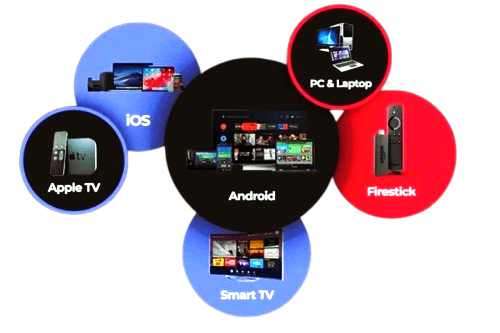
Compatible with All Devices
Sky Glass IPTV Vs Live TV Store supports all devices and installation guide like Android Smart TVs, Fire TV Stick, LG Smart TV, Samsung Smart TV, Mag Box, iOS Devices, Android Devices, MacBook, Roku, Xbox, Formula Box, Smart STB and Windows.